Skip to content

Advanced Data Science With Python course, live online for working professionalsData Science with Python

For analyst comfortable with SQL and ExcelData Scientist

Python, SQL and Power BI first, then machine learning and the MLOps that gets a model out of the notebook. From analyst comfortable with SQL and Excel to Data Scientist, taught by people who do the job.

Designed for AI-native data roles: LLM applications and retrieval-augmented generation in the Advanced Machine Learning and AI module, built and evaluated like any other model.

  • 12 weekslive classes on weekends
  • 11 modules82 topics
  • 13 toolson real data
  • VILTvirtual instructor-led, recorded the same day
View full curriculum

What is Data Science with Python?

Curriculum updated

Data Science with Python is a live online program for the analyst comfortable with SQL and Excel: the next step is being seen as a data Scientist. Python, SQL and Power BI first, then machine learning and the MLOps that gets a model out of the notebook. Classes run over 12 weeks on weekends in IST, 2.5 hours on Saturday and 2.5 hours on Sunday, and are recorded the same day, so a busy week at work doesn't cost you the class. You work in Python, SQL, Power BI, Pandas, NumPy, TensorFlow, PyTorch and MLflow. The training is project-based: 7 assignments and 1 end-to-end live structured project at each level, modelled on the mentors' production work, with a weekly 1:1 review. A counsellor confirms the batch, the schedule and the fee on one call; nothing is charged on the call.

Why this program

Why people pick Data Science with Python.

Results, your career, the part of the job you do by hand today, and who teaches it.

Results-focused

Models in production, not in a notebook

Python, SQL and Power BI first, then machine learning and the MLOps that get a model used. You leave with projects that run, reviewed like production work.

Career-focused

From analyst to data scientist

You know SQL and Excel. The programme adds Python, statistics, machine learning and deployment, on the problems a data scientist is hired to solve.

Pain-point focused

Analysis that stops at a chart

Prediction, evaluation and deployment: the steps after the chart that make analysis a decision. You build each one on real data.

Premium and professional

Taught by people who run this at work

Mentors who build this in production, projects modelled on their own, a weekly 1:1 review, recordings the same day. For analysts who want to be taken seriously, not for anyone collecting certificates.

Who this is for

For analyst comfortable with SQL and Excel.

You already do part of this job. The program closes the gap between where you are and being seen as a Data Scientist.

  • You are a analyst comfortable with SQL and Excel and want the next role
  • You know your domain; Python is what you are missing
  • You can give your weekends for the length of the program
  • You'd rather show working projects than a certificate

Probably not for you, yet

If you haven't worked in the domain at all, a counsellor will say so on the call and point you to a better starting program. If you want a certificate more than a portfolio, this isn't it.

What you'll build

Project work you can show.

One end-to-end live structured project at each level, modelled on the mentors' production work and reviewed 1:1. This is the kind of work it covers.

  • 01

    Python, taken from real work

    Modelled on the mentor's production work, with the messy parts left in, reviewed 1:1.

  • 02

    A build you own end to end

    Brief, build, review: the way a manager would hand it to you, with the checks that stop it breaking next month.

  • 03

    A review like production

    Published, documented and defended, with the notes a senior would give you.

Curriculum

Five tools, each at three levels: Fundamentals, Advanced and Expert.

Fundamentals covers the interface and the basics, Advanced is where you build projects, and Expert covers integrations and advanced use of the tool. There are 7 assignments and 1 end-to-end live structured project at each level, reviewed by a mentor.

Python

Python

Three levels · taught in Introduction to Data Science & Python and Python Data Structures, NumPy & Pandas and Exploratory Data Analysis (EDA) and Data Visualization & Business Intelligence

  1. Level 1 of 3

    Fundamentals

    The interface and the basics

    9 topics

    • Setting up Python, Jupyter Notebook and Anaconda
    • GitHub for version control
    • Python syntax, keywords and indentation
    • Variables, data types and operators
    • Conditional statements and loops
    • Functions: reusable functions, lambda and functional ideas
    All 9 topics
    • Modules, packages and installing libraries with pip
    • Lists, tuples, sets and dictionaries; comprehensions
    • Strings, files and regular expressions; CSV and JSON files

    You build: Scripts that read a file, clean it and write a summary.

    7 assignments and 1 end-to-end live structured project

  2. Level 2 of 3

    Advanced

    Building projects

    9 topics

    • NumPy: arrays, matrix operations and broadcasting
    • pandas: Series and DataFrames; cleaning, filtering and transformation
    • Data wrangling: missing values, duplicates, grouping and aggregation
    • Merging and joining datasets; combining data sources
    • Summary statistics; finding trends and patterns
    • Outliers, normalisation and transformation
    All 9 topics
    • Choosing the right chart; data storytelling
    • Charts with Matplotlib and Seaborn: bar charts, histograms, scatter and box plots
    • Interpreting results and presenting insights for business decisions

    You build: An exploratory analysis of a business dataset, cleaned, charted and presented as insights for a decision.

    7 assignments and 1 end-to-end live structured project

  3. Level 3 of 3

    Expert

    Integrations and advanced use

    8 topics

    • Working with data from databases, APIs, spreadsheets and cloud platforms
    • SQL from Python: querying a database from a notebook
    • Git and GitHub for code and data science projects
    • Calling a language model through an API; prompts and structured output
    • Turning Python code into a REST API with Flask or FastAPI
    • Running Python in Docker containers
    All 8 topics
    • Scheduling Python workflows with Airflow 3
    • Calling a REST API and reading JSON with requests

    You build: A notebook that pulls data from a database and an API, and a small Python service that runs in a container.

    7 assignments and 1 end-to-end live structured project
SQL

SQL

Three levels · taught in SQL for Data Science

  1. Level 1 of 3

    Fundamentals

    The interface and the basics

    9 topics

    • Relational database concepts
    • Tables, rows, columns and keys
    • Setting up PostgreSQL and a query editor; basic commands and syntax
    • SELECT and WHERE
    • ORDER BY and GROUP BY
    • Aggregate functions: SUM, AVG and COUNT
    All 9 topics
    • IN, BETWEEN, LIKE and NULL values
    • Joins: inner, left, right and full
    • Working with multiple tables

    You build: A small database loaded from files, and the queries behind a sales report.

    7 assignments and 1 end-to-end live structured project

  2. Level 2 of 3

    Advanced

    Building projects

    8 topics

    • CASE expressions for conditional columns
    • String and date functions
    • Subqueries and nested queries
    • CTEs: a long query in named steps
    • Window functions: ranking, running totals and moving averages
    • LAG and LEAD for period-on-period change
    All 8 topics
    • Creating views
    • Creating indexes

    You build: The queries and views behind a report: CTEs, window functions and a view for each report table.

    7 assignments and 1 end-to-end live structured project

  3. Level 3 of 3

    Expert

    Integrations and advanced use

    7 topics

    • Improving slow queries with indexing
    • Reading an execution plan to find the slow step
    • SQL from Python: querying a database from a notebook
    • Loading query results into a DataFrame
    • Building one row per customer or order for analysis and modelling
    • Avoiding duplicate rows and data leakage in a training set
    • SQL on a cloud data warehouse; what changes in a lakehouse

    You build: A training dataset built with SQL and loaded into pandas, with the slow query tuned.

    7 assignments and 1 end-to-end live structured project

Power BI

Power BI

Three levels · taught in Data Visualization & Business Intelligence

  1. Level 1 of 3

    Fundamentals

    The interface and the basics

    8 topics

    • Power BI Desktop and the Power BI Service: what each is for
    • Installation, set-up and the interface
    • Importing datasets
    • Cleaning and transforming data in Power Query
    • Data types and formatting
    • Choosing the right chart for the analysis
    All 8 topics
    • Charts and tables
    • Building a first dashboard

    You build: A first interactive dashboard on a cleaned dataset.

    7 assignments and 1 end-to-end live structured project

  2. Level 2 of 3

    Advanced

    Building projects

    9 topics

    • Data modelling and relationships
    • Star and snowflake schemas
    • Calculated columns and measures: when to use each
    • DAX formulas for analytics
    • CALCULATE, FILTER and evaluation context
    • Time intelligence: YTD, QTD, MTD and rolling averages
    All 9 topics
    • Slicers, filters and drill-through
    • Bookmarks and tooltips for storytelling
    • Data storytelling in a report

    You build: A multi-page dashboard on a data model, with DAX measures and a clear story.

    7 assignments and 1 end-to-end live structured project

  3. Level 3 of 3

    Expert

    Integrations and advanced use

    8 topics

    • Publishing reports to the Power BI Service
    • Scheduled refresh, workspaces and sharing with the right access
    • Python scripts as a data source
    • Python visuals in a report: Matplotlib and Seaborn charts
    • Showing predictions and model metrics in a dashboard
    • Explaining a model’s results to business users
    All 8 topics
    • Copilot in Power BI: a report page and a narrative visual
    • Copilot in Power BI: preparing a semantic model for AI

    You build: A report on a model’s predictions, refreshed on a schedule and shared with the right access.

    7 assignments and 1 end-to-end live structured project

Machine learning

Three levels · taught in Machine Learning Foundations and Advanced Machine Learning & AI and Generative AI for Data Science

  1. Level 1 of 3

    Fundamentals

    The interface and the basics

    10 topics

    • Types of machine learning: supervised, unsupervised and reinforcement
    • The machine learning workflow and data preparation
    • scikit-learn basics: train-test split, fit and predict
    • Preprocessing and pipelines in scikit-learn
    • Linear regression and logistic regression
    • Decision trees and random forest
    All 10 topics
    • Accuracy, precision, recall and F1 score
    • Cross-validation and preventing overfitting
    • Feature selection and feature engineering
    • Hyperparameter tuning

    You build: A model that predicts a yes-or-no outcome, checked with cross-validation.

    7 assignments and 1 end-to-end live structured project

  2. Level 2 of 3

    Advanced

    Building projects

    9 topics

    • Clustering with K-Means
    • Dimensionality reduction with PCA
    • AI in business automation and analytics
    • Natural language processing: text preprocessing and tokenisation
    • Sentiment analysis and text classification
    • Recommendation systems: collaborative filtering
    All 9 topics
    • Content-based recommendation systems
    • Neural networks and perceptrons
    • Activation functions and backpropagation

    You build: The capstone projects: customer churn prediction, a sales forecasting model and a sentiment analysis system.

    7 assignments and 1 end-to-end live structured project
  3. Level 3 of 3

    Expert

    Integrations and advanced use

    8 topics

    • PyTorch, TensorFlow and Keras basics
    • Building neural network models
    • Image recognition with a CNN; object detection basics
    • Calling a language model through an API; prompts and structured output
    • Embeddings and a vector store
    • Retrieval-augmented generation: answering questions over your own documents
    All 8 topics
    • Evaluating LLM output: groundedness, relevance and test datasets
    • Tracing and evaluation with MLflow 3

    You build: A question-answering app over your own documents, with its answers evaluated and traced.

    7 assignments and 1 end-to-end live structured project

MLOps and deployment

Three levels · taught in MLOps – Machine Learning Operations and Generative AI for Data Science

  1. Level 1 of 3

    Fundamentals

    The interface and the basics

    7 topics

    • The MLOps lifecycle: data collection, training, deployment, monitoring and retraining
    • Automation, and how data scientists, engineers and DevOps teams work together
    • Git and GitHub for code and data science projects
    • Tracking experiments and model versions with MLflow 3
    • Turning a trained model into a REST API with Flask or FastAPI
    • Deploying a model in a Docker container
    • Cloud platforms for machine learning in brief: AWS, Azure and Google Cloud

    You build: The production project named in the course: a prediction API for customer churn analysis.

    7 assignments and 1 end-to-end live structured project
  2. Level 2 of 3

    Advanced

    Building projects

    8 topics

    • The MLflow model registry: registering a model and its versions
    • Moving a version from staging to production, and rolling back
    • Automated pipelines for data preprocessing, training and evaluation
    • Scheduling model workflows with Airflow 3 or another orchestration platform
    • Integrating models with web or enterprise applications
    • Monitoring model performance in production
    All 8 topics
    • Detecting data drift and concept drift
    • Triggering model retraining

    You build: The production project named in the course: an end-to-end ML pipeline with training, deployment and monitoring.

    7 assignments and 1 end-to-end live structured project
  3. Level 3 of 3

    Expert

    Integrations and advanced use

    7 topics

    • LLMOps: versioning prompts
    • Tracking LLM experiments
    • Watching the cost, speed and quality of an LLM app in production
    • Tracing and evaluation of an LLM app with MLflow 3
    • Model compression, batching and caching
    • Inference speed and scalability for real-time applications
    • Scalable environments: containers on a cloud platform

    You build: An LLM app in production, with its prompts versioned and its cost, speed and quality watched.

    7 assignments and 1 end-to-end live structured project
Module by module

Eleven modules, in the order the work happens.

About 12 weeks. 7 assignments and 1 end-to-end live project at each level, reviewed by a mentor.

  • Reviewed in Nov 2026: 34 topics added to match what the work now asks for.

11 modules · 82 topics · pick a module to see what it covers

Module 1 of 11

Introduction to Data Science & Python

Equip learners with strong Python and EDA foundations to analyze, clean, visualize, and prepare data for analytics and machine learning.

  • Understanding Data Science

    Introduction to Data Science lifecycle and industry applications. · Roles in Data Science: Data Analyst, Data Scientist, ML Engineer.

  • Data Types & Data Sources

    Structured vs Unstructured data. · Data sources such as databases, APIs, spreadsheets, and cloud platforms.

  • Data Science Workflow

    Data collection, cleaning, analysis, modeling, and deployment. · Real-world use cases across finance, healthcare, marketing, and e-commerce.

  • Environment Setup

    Installing Python, Jupyter Notebook, and Anaconda. · Introduction to GitHub for version control.

  • Python Basics

    Syntax, keywords, and indentation rules. · Variables, data types, and operators.

  • Control Flow

    Conditional statements (if, elif, else). · Loops (for, while) and iteration techniques.

  • Functions

    Creating reusable functions. · Lambda functions and functional programming.

  • Python Packages

    Introduction to modules and packages. · Installing and managing libraries using pip.

Tools

The tools you'll work in.

You use each one on the kind of data your mentors handle at work, not on a toy example.

  • Python
    Python
  • SQL
    SQL
  • Power BI
    Power BI
  • Pandas
    Pandas
  • NumPy
    NumPy
  • MAT
    Matplotlib
  • SEA
    Seaborn
  • Jupyter
    Jupyter
  • TensorFlow
    TensorFlow
  • PyTorch
    PyTorch
  • MLflow
    MLflow
  • Generative AI
    Generative AI
  • Statistics
    Statistics

Python for Data Science

Learn Python programming for data analysis, data manipulation, and machine learning using libraries such as Pandas, NumPy, Scikit-learn, and TensorFlow.

SQL for Data Management

Develop the ability to extract, manage, and analyze large datasets from relational databases using SQL queries and advanced data operations.

Data Analysis & Statistics

Understand descriptive statistics, probability, and exploratory data analysis (EDA) to identify patterns, trends, and insights in datasets.

Data Visualization & Power BI

Create interactive dashboards and reports using Power BI and Python visualization libraries to present meaningful insights for business decision-making.

Machine Learning & Artificial Intelligence

Build predictive models using machine learning algorithms, feature engineering, and model evaluation techniques.

Deep Learning Applications

Learn neural networks and deep learning frameworks to solve complex problems such as image recognition, NLP, and advanced predictive analytics.

And the skills around the tool

  • Critical Thinking
  • Abstract Thinking
  • Analytical Thinking
  • Problem-Solving Mindset
  • Business Acumen
  • Communication & Storytelling
  • Stakeholder Thinking
  • Curiosity & Question Framing
  • Attention to Detail (with big-picture balance)
  • Learning Agility

TTFA Academy is an independent training provider. It is not affiliated with, endorsed by or a partner of Microsoft, Salesforce or Alteryx. Microsoft, Power BI, Excel and Fabric are trademarks of the Microsoft group of companies. Tableau is a trademark of Salesforce, Inc. Alteryx is a trademark of Alteryx, Inc. Names are used only to identify the tools taught.

AI-native

AI is taught inside each tool, and as a module of its own.

Designed for AI-native data roles: LLM applications and retrieval-augmented generation in the Advanced Machine Learning and AI module, built and evaluated like any other model.

AI inside each tool

  • Python

    Python

    An assistant beside your notebook

    • Asking an assistant to explain or fix a piece of code
    • Running it on a case you already know the answer to
  • SQL

    SQL

    Prompting for SQL

    • Turning a plain-language question into a query
    • Giving the assistant the schema: table and column names
    • Explaining, fixing and documenting a query with an assistant
  • Power BI

    Power BI

    Copilot in Power BI

    • Creating a report page and a narrative visual with Copilot
    • Preparing a semantic model for AI: descriptions, verified answers, AI instructions
    • What Copilot needs to run: Fabric capacity, not a Pro licence alone

    Taught in Data Visualization & Business Intelligence

  • Machine learning

    Language models, retrieval and evaluation

    • Calling a language model through an API
    • Prompts and structured output
    • Embeddings and a vector store
    • Answering questions over your own documents
    • Groundedness, relevance and test datasets
    • Tracing and evaluation with MLflow 3

    Taught in Generative AI for Data Science

  • MLOps and deployment

    LLMOps

    • Versioning prompts and tracking LLM experiments
    • Watching the cost, speed and quality of an LLM app in production

    Taught in Generative AI for Data Science

The module · 6 topics

Generative AI for Data Science, topic by topic

An assistant drafts; you answer for the number. These topics include how to check what an assistant gives you, and how to keep data private while you use one.

  1. Topic 1

    Large Language Model Applications

    • Calling a language model through an API
    • Prompts and structured output
  2. Topic 2

    Retrieval-Augmented Generation (RAG)

    • Embeddings and a vector store
    • Answering questions over your own documents
  3. Topic 3

    Evaluating LLM Output

    • Groundedness, relevance and test datasets
    • Tracing and evaluation with MLflow 3
  4. Topic 4

    LLMOps

    • Versioning prompts and tracking LLM experiments
    • Watching the cost, speed and quality of an LLM app in production
  5. Topic 5

    Checking AI Output

    How you check AI output

    • Reading the code before using it
    • Testing on a case you already know the answer to
    • Saying where the assistant helped and where you changed its answer
  6. Topic 6

    Data Privacy with AI Tools

    How you keep data private

    • What enterprise assistants do with your prompts, and what consumer chatbots do
    • Keeping customer and company data out of public tools
    • India’s DPDP Rules: what changes for personal data

What a project looks like

Brief, build, review. Like work.

One end-to-end live structured project at each level. Each one is modelled on a mentor's real production work, never on client data.
  • The brief

    A one-page brief the way a manager would write it: the ask, the data, the deadline, what “done” means.

  • The build

    You build it over the level, with a 1:1 review every week. The mentor reviews the work-in-progress.

  • The review

    A production-style review: what would break, what a senior would change, what to say about it in an interview.

LMS experience

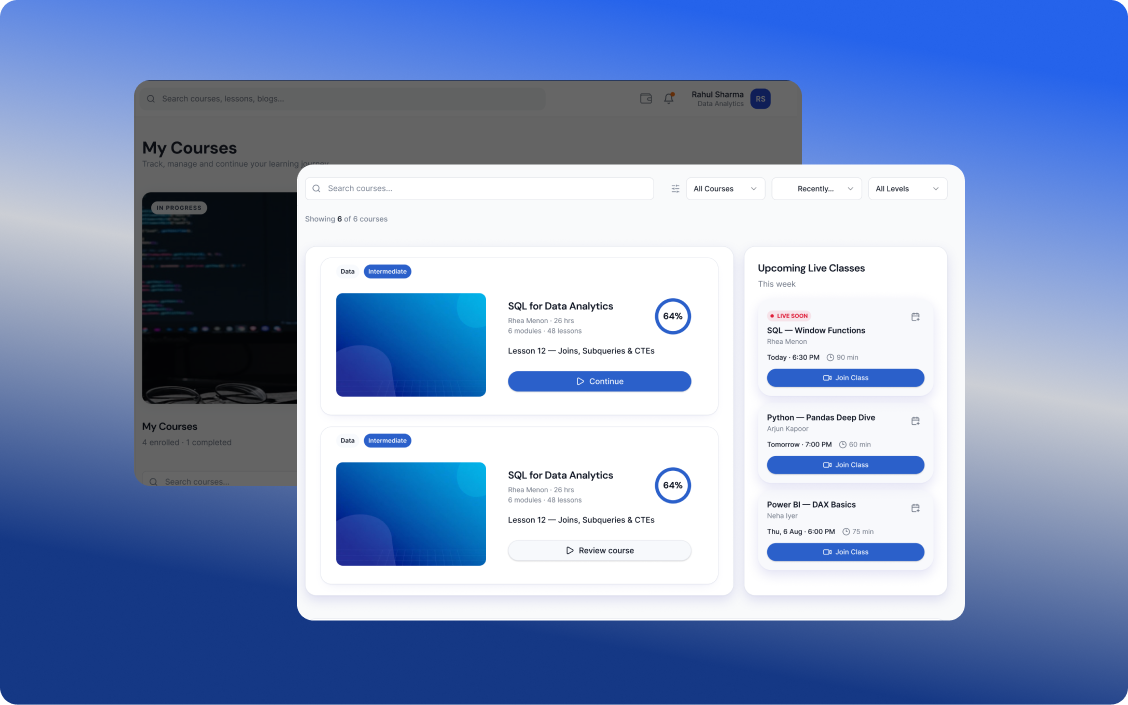
Your complete learning journey, all in one place

Learn at your pace, practise through real-world projects, build your skills, earn certifications, and discover opportunities that match your potential.

Learn and build skills
Step 01

Learn and build skills

Complete industry-relevant courses designed to build practical skills and prepare you for real-world applications.

  • Hands-on learning
  • Practical assignments and projects
  • Industry-aligned curriculum
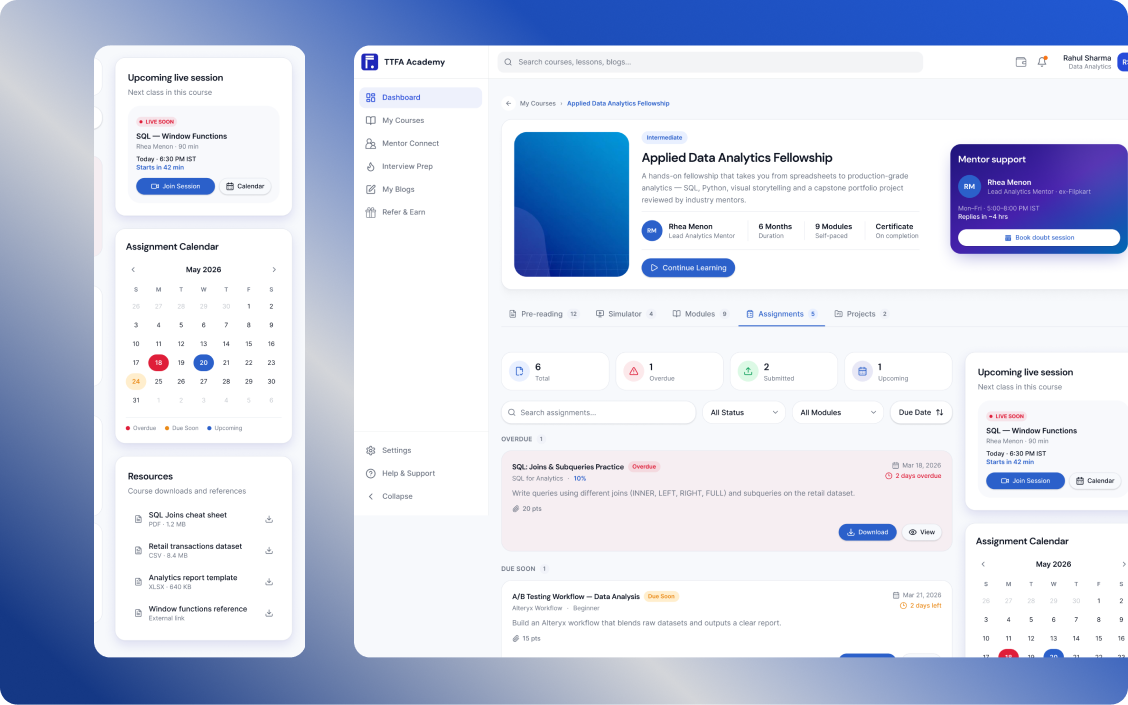
Learn through real projects
Step 02

Learn through real projects

Put your learning into practice with assignments and hands-on projects designed to build practical skills and help you grow with confidence.

  • Practical assignments to strengthen your skills
  • Real-world projects to apply what you learn
  • Build experience and grow your portfolio
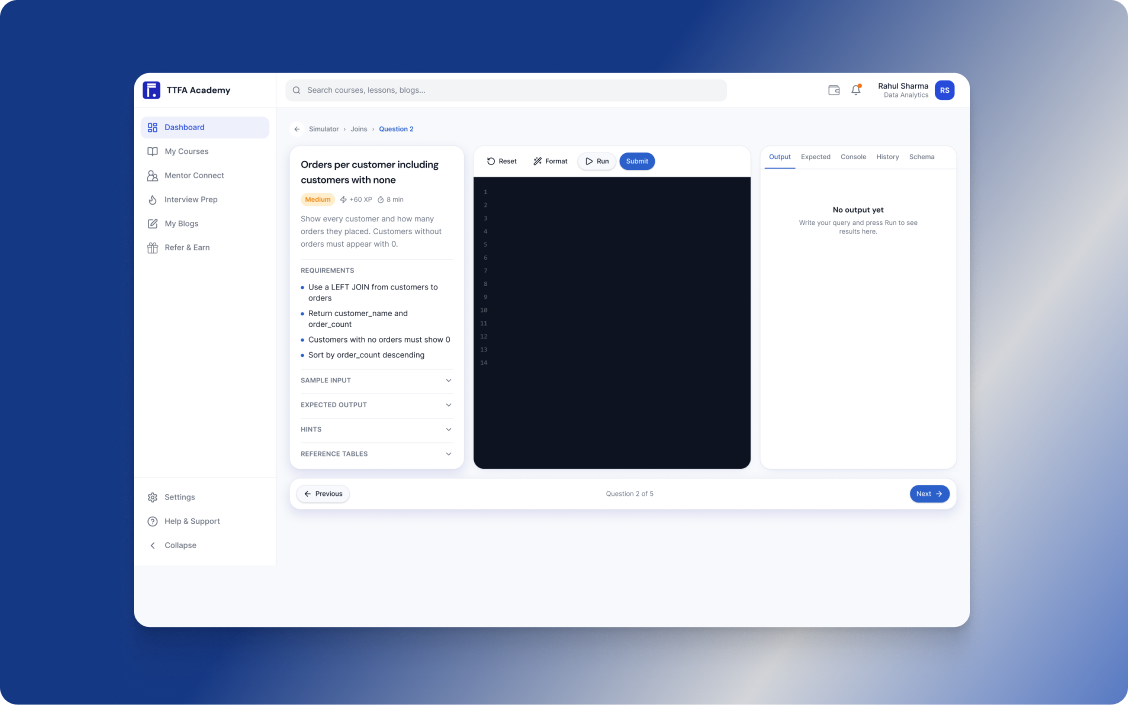
Learn by doing
Step 03

Learn by doing

Practise real-world tasks with interactive simulators that help you apply your knowledge, sharpen your skills, and prepare for the workplace.

  • Real-world practice
  • Interactive simulations
  • Build skills with confidence
Discover your next opportunity
Step 04

Discover your next opportunity

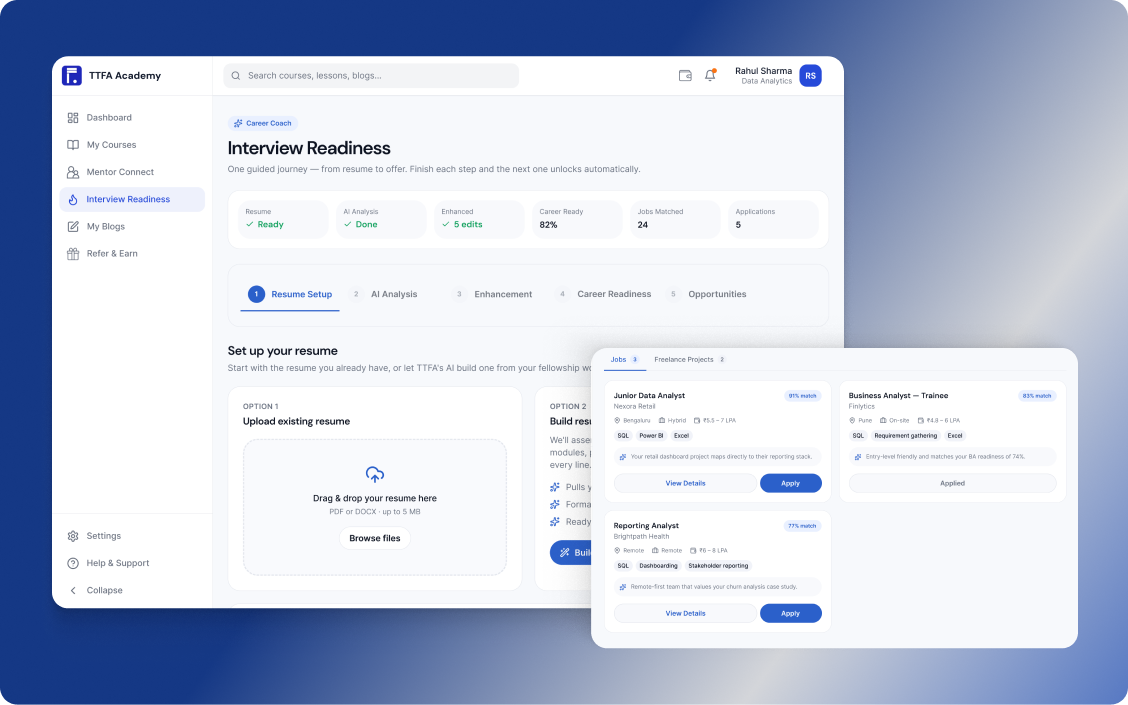
Upload and enhance your resume, then discover job and freelance opportunities matched to your skills, experience, and career goals.

  • AI-powered resume enhancement
  • Personalised job and freelance recommendations
  • Apply to opportunities that match your profile
Earn certifications as you grow
Step 05

Earn certifications as you grow

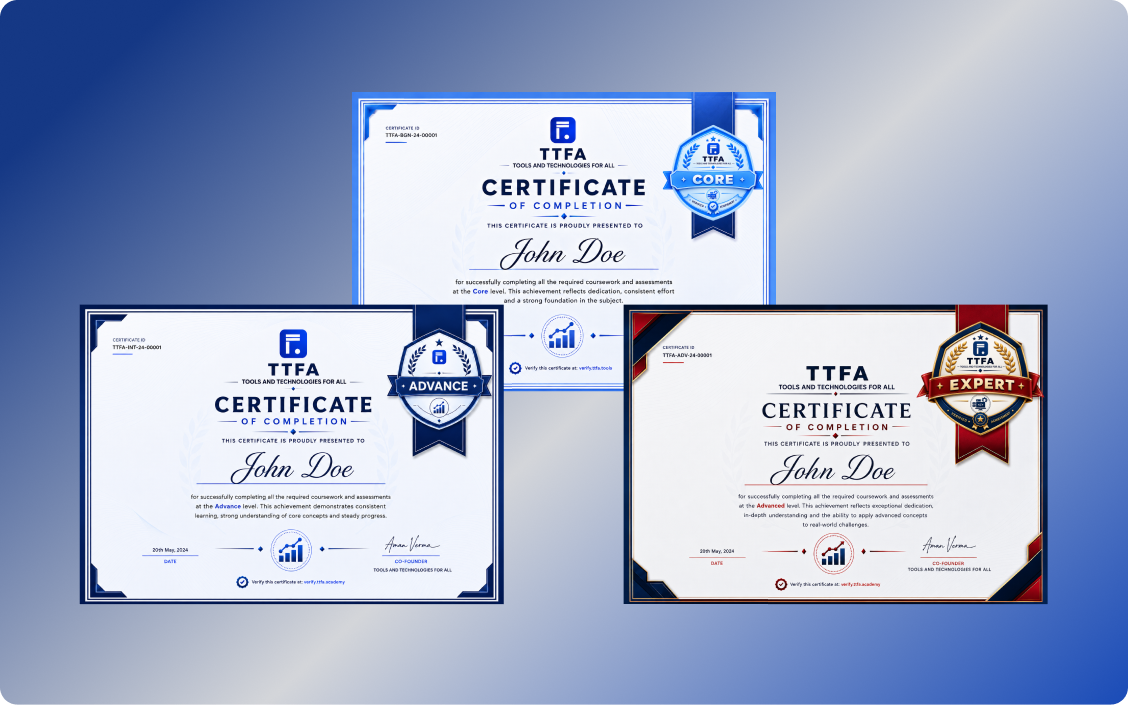
Complete projects, build your skills, and unlock certifications at each level as you progress through your learning journey.

  • Fundamentals
  • Advanced
  • Expert

Faculty

You learn the work, not only the tool.

TTFA Academy brings practitioners from Fortune 500 companies, each with 10 to 12 years of experience. You learn the real challenges of the work from people who have met them, not only how to use the tools.

What that means in class

  • Project-based live training on weekends

    Live classes of 2.5 hours on Saturday and on Sunday, built around projects modelled on production work rather than on a toy example.

  • The weekly 1:1 review

    Once a week you go through your own work with a practitioner: what holds, what breaks, and what to change before the next class.

  • Feedback on the 7 assignments at each level

    Each assignment comes back with comments from someone who does this work, before the end-to-end live structured project of that level.
  • Production habits

    Naming, documenting, checking totals and handing work over, the way it is done on a team where other people rely on the number.

What a tool lesson teaches, and what a practitioner adds

  • A tool lesson teachesHow to write a join

    A practitioner addsWhy the totals change after a join, and how to check them

  • A tool lesson teachesHow to build a dashboard

    A practitioner addsWhat a manager asks in the first minute

  • A tool lesson teachesHow to automate a report

    A practitioner addsWhat to do on the morning the refresh fails

  • A tool lesson teachesHow to use an AI assistant

    A practitioner addsWhen not to trust it, and how to test it

Your mentors

People who do this work in production.

Names, employers and photos appear only with their written permission.

How the weeks run

Built around a full-time job.

A counsellor confirms the exact days and times for your batch on the call.

  1. Saturday live class

    2.5 hours with the mentor, on the work of the week.

  2. Sunday live class

    2.5 hours more: 5 hours of live class a weekend, built around the project.

  3. Weekly 1:1 review

    A 1:1 review with a mentor every week; every class is recorded the same day.

  4. Assignments and the live project

    7 assignments and 1 end-to-end live structured project at each level, reviewed like production work.

Plans and prices

Subscription plans

Three plans for Data Science with Python. Pick how you want to learn: at your own pace, live with career preparation, or with everything included.

  • Launch price on Pro: ₹14,999
  • Every price includes GST
  • Instalments available: a counsellor confirms the options in writing
  • Premium

    Most chosen

    Live training and career preparation

    For learners who want live classes, mentor feedback and career preparation.

    List price ₹39,999

    Plan price ₹29,999

    Save ₹10,000

    incl. GST · instalments available

    • Live weekend classes with working professionals: 2.5 hours on Saturday and on Sunday
    • One batch (batch changes are not included)
    • All three levels: Fundamentals, Advanced and Expert
    • 7 assignments and 1 end-to-end live structured project at each level, with mentor feedbackIn Data Science with Python: 105 assignments and 15 live projects, across its 5 tools.

    • A weekly 1:1 review
    • Real-world case studies
    • Resume preparation, mock interviews and career guidance
    • LMS access for 2 years

Questions about the plans

A counsellor answers anything else on a call. Nothing is charged on the call.

Questions

About this program.

Anything else: ask on the call.

Yes. The program assumes you know your work, not the tool. If you've never worked in the domain, a counsellor will point you to a better start.

Bring your current work to the call.

A counsellor looks at what you do today and tells you, straight, whether Data Science with Python is the right next step.

One account on the web LMS and the app